An etched metal nameplate enquiry should bring together the graphics, finished plate drawing and order information in one controlled brief. The quotation needs to describe what is etched, what receives paint, which metal remains exposed and how the plate will be fixed.
For purchasing teams, sign contractors and product-identification buyers, clear artwork makes it easier to compare quotations against the same requirements. It also gives the manufacturer a defined starting point for reviewing small details, colours and construction.
Use this checklist with the etched and paint-filled metal sign product information when preparing your RFQ.
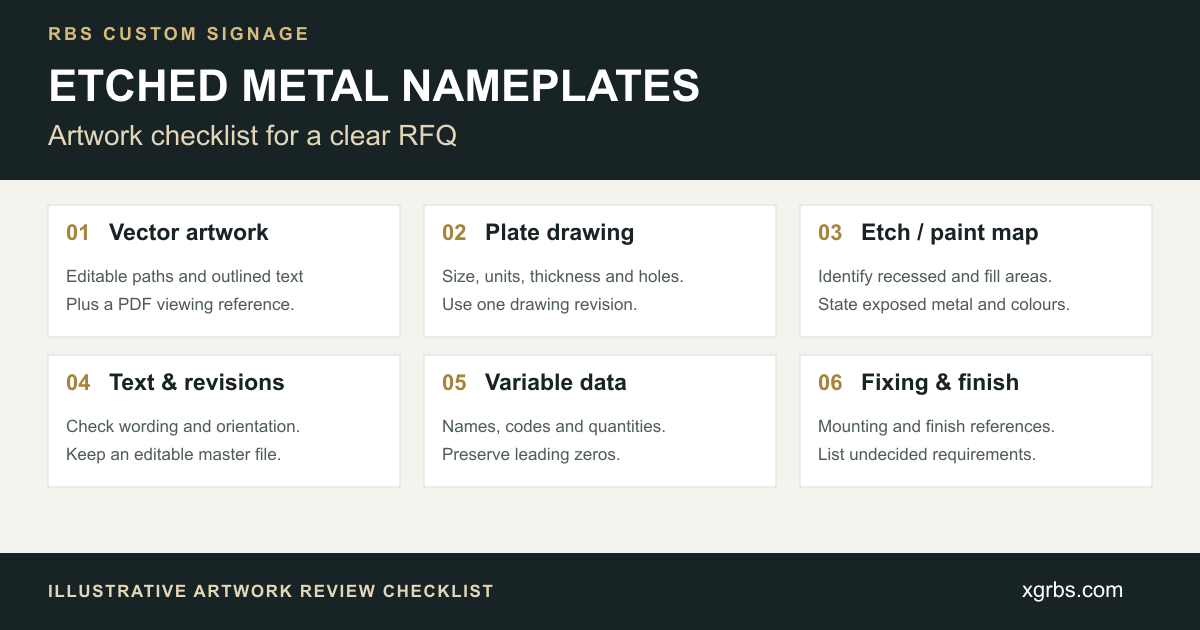
1. Prepare a Coordinated Artwork Package
Organise the enquiry into three connected parts:
| File or document | Information to include |
|---|---|
| Graphic artwork | Final lettering, logos, symbols, the intended etched areas and paint-colour references. |
| Dimensioned plate drawing | Finished outline, width, height, thickness, corners, holes, slots and fixing positions. |
| Order schedule | Drawing revision, quantity per design, variable information, sample requests and delivery destination. |
Use the same drawing number and revision across the package. If the plate drawing and graphic file show different wording or hole positions, identify which version needs review before requesting production approval.
AI, EPS, SVG or a suitable vector PDF can be useful starting points for artwork review. The actual contents matter: a file saved in a design format can still include placed bitmap images. Supply the original editable artwork where available and include a PDF reference showing the intended appearance.
Adobe explains that a PDF can represent both vector and bitmap information. A PDF extension alone therefore does not establish that a logo contains usable vector paths. Adobe PDF import guidance
2. Define the Finished Plate and Fixing Details
The graphic layout and the physical plate drawing should describe the same finished part. Include:
- Overall width and height, with units clearly stated.
- Metal type and grade where specified, together with thickness.
- Outline shape, corner treatment, cut-outs and slots.
- Hole sizes and positions referenced to an agreed drawing datum.
- Orientation of the plate and its visible face.
- The proposed adhesive area, studs or other fixing requirement.
Keep drawing dimensions readable and distinguish them from the graphics that should appear on the plate. If mounting details are undecided, label them as pending and describe the installation surface for review.
For a wider comparison of plate construction and applications, see custom metal nameplates.
3. Identify Etched Areas, Paint Fill and Exposed Metal
A colour logo mock-up does not define the complete manufacturing instruction. Provide a clear legend for the intended result:
- Which letters, logos or background areas are recessed.
- Which recessed areas receive paint and the reference for each colour.
- Which surfaces remain exposed metal.
- The required appearance of the exposed surface and its grain direction, where relevant.
If a black-and-white artwork layer is supplied, state what black and white represent. Ask for that interpretation to be confirmed during the drawing review rather than assuming a shared convention.
Separate the graphic instructions from material and finish references. For example, an exposed metal surface, a painted graphic and an optional plated appearance are different items to identify in the brief. Record any physical sample that should be used for approval.
4. Check Wording and Outline the Final Text
Before preparing the production version, proofread spelling, punctuation, units, symbols and character case. Check the orientation and position of each line against the finished plate drawing.
Converting final static text to outlines can help preserve its appearance when the recipient does not have the same fonts. In Illustrator, outlining turns type into vector shapes, so keep a separate editable master for later wording changes. Adobe guidance on converting type to outlines
For orders with different names or codes, keep the exact variable text in a separate schedule as well. Outlined artwork should not be the only record of information that changes from plate to plate.
5. Request Review of Fine Detail Before Approval
Small lettering, narrow lines, gaps and closely spaced colour areas need review against the proposed metal, artwork, etching detail and paint-fill approach.
Ask the manufacturer to identify any detail that needs adjustment and to show the proposed change in a revised drawing or proof. Review the smallest text and the most detailed logo area at the intended finished size.
RBS confirms etching depth, minimum detail and the paint system after reviewing the design and project requirements. This guide does not set a universal minimum line width, character size or etching depth for every nameplate.
For a new design, state whether you need a physical sample or finish review before a larger order. Sample charges and the production arrangement are confirmed for the specific quotation.
6. Control Variable Data and Revisions
When the order contains several identifiers, provide one schedule with a row for each variation. Suggested fields are:
| Field | What the buyer should specify |
|---|---|
| Plate reference | A unique code linked to the correct drawing. |
| Exact text or identifier | Final names, codes, numbers or approved wording. |
| Quantity | The number required for that variation. |
| Drawing revision | The version that applies to the plate. |
| Packing group | Equipment set, room, floor, zone or another agreed grouping. |
Preserve leading zeros, capitalisation and punctuation. Check the exported file to confirm that identifiers still appear as intended. Mark spare plates and any unassigned numbers separately.
If information changes, issue a new revision and identify the affected rows. Keep one current schedule with the artwork package so purchasing, drawing review and packing instructions refer to the same information.
7. Complete the Approval and RFQ Check
When a drawing, proof or sample is supplied for review, check it against the complete brief:
- Finished dimensions, outline and thickness.
- Wording, variable information and quantities.
- Etched areas, paint colours and exposed metal finish.
- Hole positions, orientation and fixing details.
- The correct drawing and artwork revisions.
- Agreed sample, packing-label and grouping requirements.
Return comments together, identify the revision being reviewed and state which details remain open. Ask for unresolved items to be reflected in the quotation or revised drawing before production is approved.
Frequently Asked Questions
Can I request a quotation using a JPG or photograph?
A reference image can communicate the intended appearance. Include finished dimensions and explain which details need to be reproduced. Ask whether artwork preparation or additional drawing work is required before manufacturing; a photograph alone does not define all plate and graphic details.
Does a PDF mean the artwork is vector?
No. PDFs can contain vector paths, bitmap images and text. Supply the original editable file where possible and ask for the actual graphic content to be checked during artwork review.
Should hole positions be included in the artwork file?
Show fixing positions on the dimensioned plate drawing and make the intended relationship to the graphics clear. If the graphic file also shows holes, ensure that both documents use the same positions, units and revision.
What if the etching depth or paint colour is undecided?
Mark the item as pending and provide the intended visual result, material, installation environment and any reference sample. Request a review rather than inserting an assumed production value.
Send Your Nameplate Artwork for Review
For a project quotation, send the artwork, finished dimensions, metal and thickness, etch and paint-fill instructions, fixing details and quantity. Add the variable-data schedule, sample request and delivery country or postal code where applicable.
Use the RBS quotation page or email xiaronggao168@gmail.com. The contact page prepares a message in your selected application; attach your files and press Send to complete the enquiry.
For the broader project brief, review how to specify custom metal signs.